Debricking a GL-MT2500A Brume 2 with UART
The short version
My Brume 2 Alloy stopped booting after a power outage. The reset-button U-Boot recovery site still opened, but every legitimate image I tried through the browser—old firmware, current stable firmware, beta firmware, and the official 2025 U-Boot—ended at the same useless page:
UPDATE FAILED
Something went wrong during update
Probably you have chosen wrong file.
The files were not wrong. UART exposed the real failure:
Loading Environment from MMC... unable to select a mode : -110
mmc_init: -524
*** Warning - No block device, using default environment
...
*** Failed to initialize MMC device 0! ***
The September 2022 U-Boot could not initialize the eMMC, so its web updater could not write either firmware or U-Boot. I then:
- Connected a 3.3 V CP2102 USB-TTL adapter at
115200 8N1. - Used
mtk_uartbootto load a RAM-only BL2 and the official February 2025 MT2500 U-Boot/FIP. - Proved that the newer U-Boot could read the same eMMC and that Linux could mount it.
- RAM-booted the 2025 U-Boot again, interrupted it with
gl, and ranmtkupgrade fip. - Sent the official 2025 FIP over XMODEM and wrote it permanently.
- Rebooted normally and verified that the router now started with the February 2025 U-Boot.
- Entered the repaired U-Boot recovery page, flashed model-correct firmware successfully, switched my Mac from the recovery subnet to the normal subnet, opened the GL.iNet web UI, and set a new admin password. I used
4.9.0_beta3in my final run; GL.iNet’s conservative recommendation was stable4.7.4.
The decisive lesson was that an “MMC failure” from one bootloader did not prove dead eMMC silicon. A newer bootloader, first tested entirely from RAM, could read it and boot from it.
1. How the failure presented
This was a GL.iNet Brume 2 Alloy, model GL-MT2500A. I had not been experimenting with custom images. The router had been receiving normal official updates, then a power outage occurred and it stopped starting normally.
It was not completely dead. Holding Reset while applying power still reached the U-Boot failsafe site at:
http://192.168.1.1/The page identified the installed bootloader as:
U-Boot 2022.07-rc3 (Sep 12 2022 - 19:58:08 -0700)GL.iNet support had given me the documented two-step recovery path:
- Upload the new U-Boot at
http://192.168.1.1/uboot.html. - Upload firmware at
http://192.168.1.1/.
The exact official files were:
uboot-mt2500-20250224-md5-74286e770cfb041b611d80d4adaef189.bin
openwrt-mt2500-4.7.4-0328-1743128340.bin
I used Chrome/Edge as instructed, not Firefox, and used the correct page for each image. Both failed with the same “wrong file” message. The old U-Boot could serve HTML, accept an upload, and display an error, but the router still would not boot.
2. Checking other MT2500 failures
The first useful move was to stop guessing and compare my failure with other MT2500 reports. I crawled the GL.iNet forum, saved local copies of relevant Discourse threads, and kept the sanitized output in the public artifact Gist linked at the end. The threads that mattered most were:
- GL-MT2500 and GL-MT2500A bricked after update to 4.5.0
- BUG Uboot Debrick Router BRUME 2 GL-MT2500
- Brume 2 Uboot update failed
- Critical Problem Notification for GL-MT2500/GL-X3000/GL-XE3000
- Recover u-boot on GL-MT2500 (Brume 2)
What the crawl established
The forum contained several different failure classes that looked similar from a browser:
- Some owners recovered normally by installing the official U-Boot and then firmware.
- Some had a successful firmware write but no DHCP or admin UI; a support-provided temporary
4.6.10image helped several of those units. - Some only needed to return the computer’s Ethernet interface to DHCP after flashing.
- A more serious group matched my unit: the old U-Boot page opened, but correct firmware and correct U-Boot both failed as “wrong file.” Public threads did not contain a dependable web-only repair for that exact state.
That distinction mattered. The temporary 4.6.10 image could help a router that was able to write an image but booted it badly. It could not fix a bootloader that could not initialize its storage.
The official critical notice
GL.iNet’s critical problem notification said that incorrectly defined software parameters could cause abnormal operation, recovery trouble, and reduced service life. For the MT2500 family, it called for both:
U-Boot:  2025-02-24 15:04:07
Firmware: 4.7.4
It specifically said the U-Boot upgrade remained mandatory even if current firmware was already installed, and warned users to use Chrome or Edge rather than Firefox.
An OpenWrt change supplied another clue: PR #18433, titled “Fix possible emmc communication anomalies in GL.iNet MT2500/X3000/XE3000,” lowered the MT2500 eMMC maximum frequency from 52 MHz to 26 MHz and added 12 mA pin drive strength in OpenWrt’s device tree.
That was evidence that the family’s problem involved eMMC communication parameters, but it was not proof of one exact root cause in my installed GL.iNet U-Boot. In fact, the repaired 2025 U-Boot later reported a 52 MHz high-speed mode while working. The defensible conclusion from my lab was narrower: the September 2022 build failed to initialize this eMMC, while the February 2025 build succeeded on the same hardware.
3. Verifying and exhausting the low-risk path
Before opening the case, I downloaded and hashed every candidate. I renamed the browser-facing copies to avoid long-filename or browser-form oddities reported on related devices.
Temporary 4.6.10 firmware
openwrt-mt2500-4.6.10-1118-1731927038.bin
SHA-256
22780d5389fc7887e44ddb65b34c640af502fa3049b3e11408d1850bc989a5ed
Temporary image that helped some forum users.
Stable 4.7.4 firmware
openwrt-mt2500-4.7.4-0328-1743128340.bin
SHA-256
3de78f88a2cc204c089cd1c262346786796d43a223564b1f792f3e8515cc8904
Required stable release from the official notice.
Then-current 4.9.0 beta2 firmware
mt2500-4.9.0_beta2-1022-0610-1781084886.bin
SHA-256
2d5062748d59e532b31e0b93584937b780807908ddec3efd96da3d2d0a136c1a
Latest testing image from the firmware API at the time.
Official February 2025 U-Boot/FIP
uboot-mt2500-20250224-...bin
SHA-256
90b28ab596783e8cab09e1e38d77a37cdbc1e3b9fba855847bc8248b213a40be
Official bootloader image that eventually became the permanent FIP.
The prepared tree was:
~/Downloads/mt2500-low-risk/
├── 01-old-special-4.6.10/openwrt.bin
├── 02-release-4.7.4/openwrt.bin
├── 03-beta-latest/openwrt.bin
└── 99-uboot-do-not-use-first/uboot.bin
For each web attempt I used:
Computer Ethernet: 192.168.1.2/24
Router recovery IP: 192.168.1.1
Computer -> Brume 2 LAN/1GbE port
All other router network cables disconnected
VPN/proxy/Tailscale/ZeroTier disabled
Chrome/Edge private window
Stable router power
I tried all three firmware files at /, then the official bootloader at /uboot.html. Every attempt returned the same generic failure. Short filenames made no difference.
The screenshots I sent support captured the maddening part: the old U-Boot web UI could accept an upload, compute an MD5, and ask for confirmation. The failure came only when it tried to commit the image.
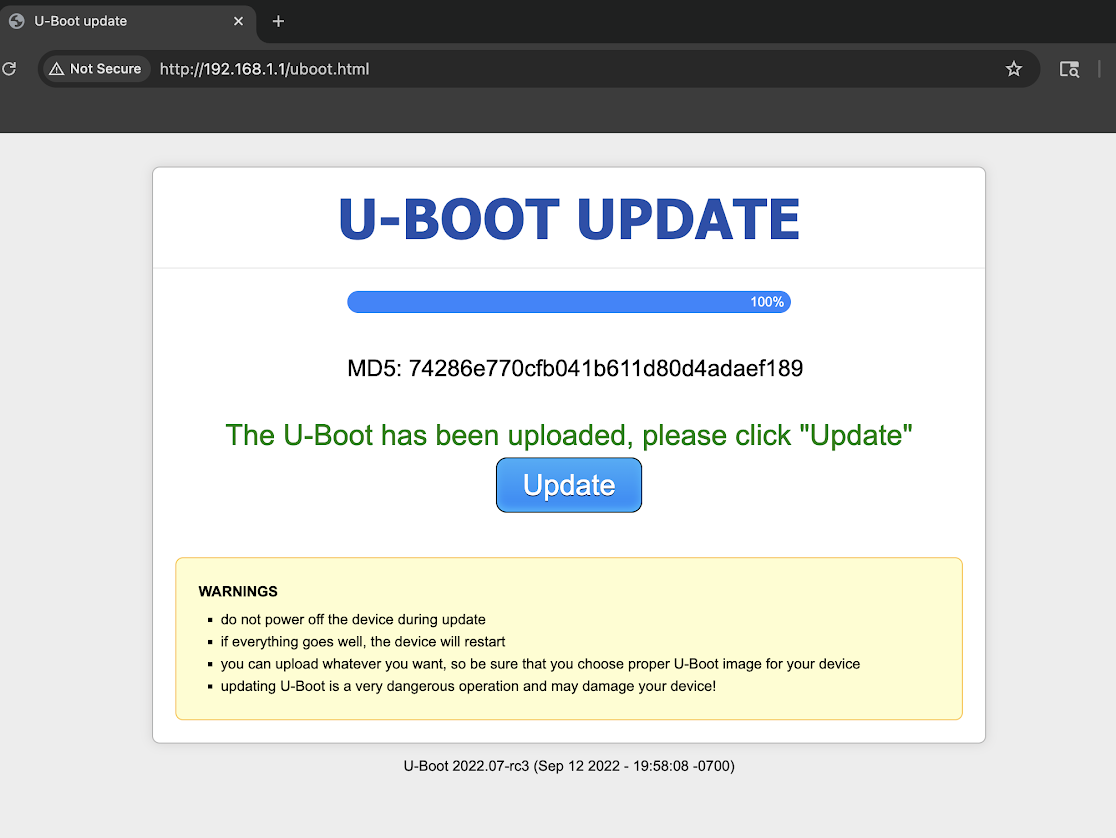 1. U-Boot image uploaded and accepted by the old recovery UI
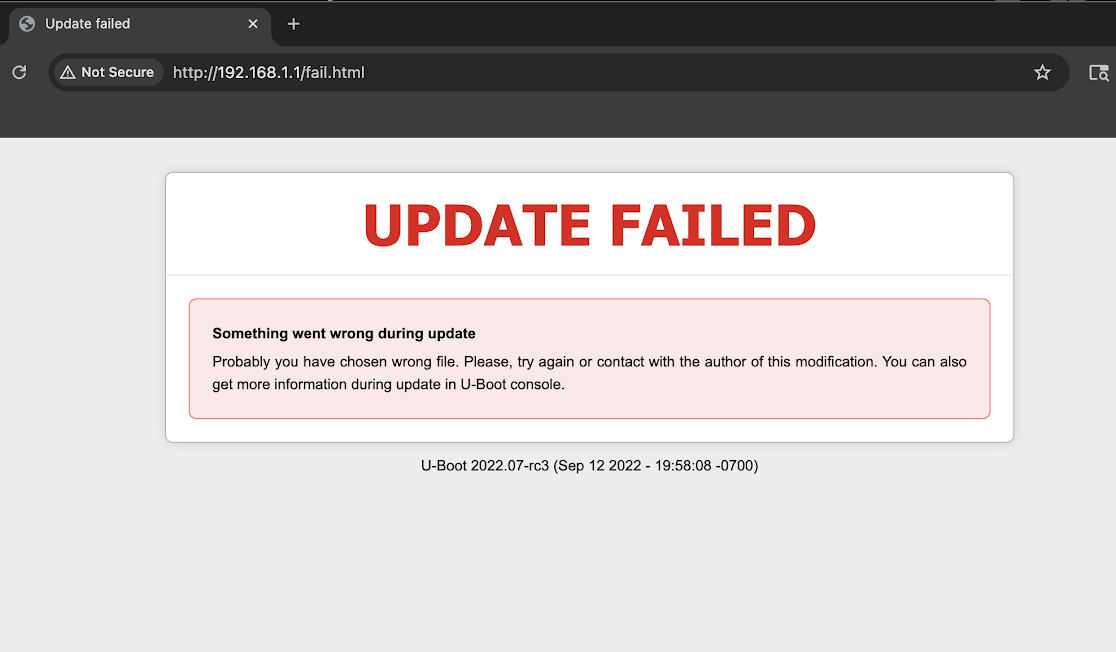 2. U-Boot update attempt ended at the generic “wrong file” page
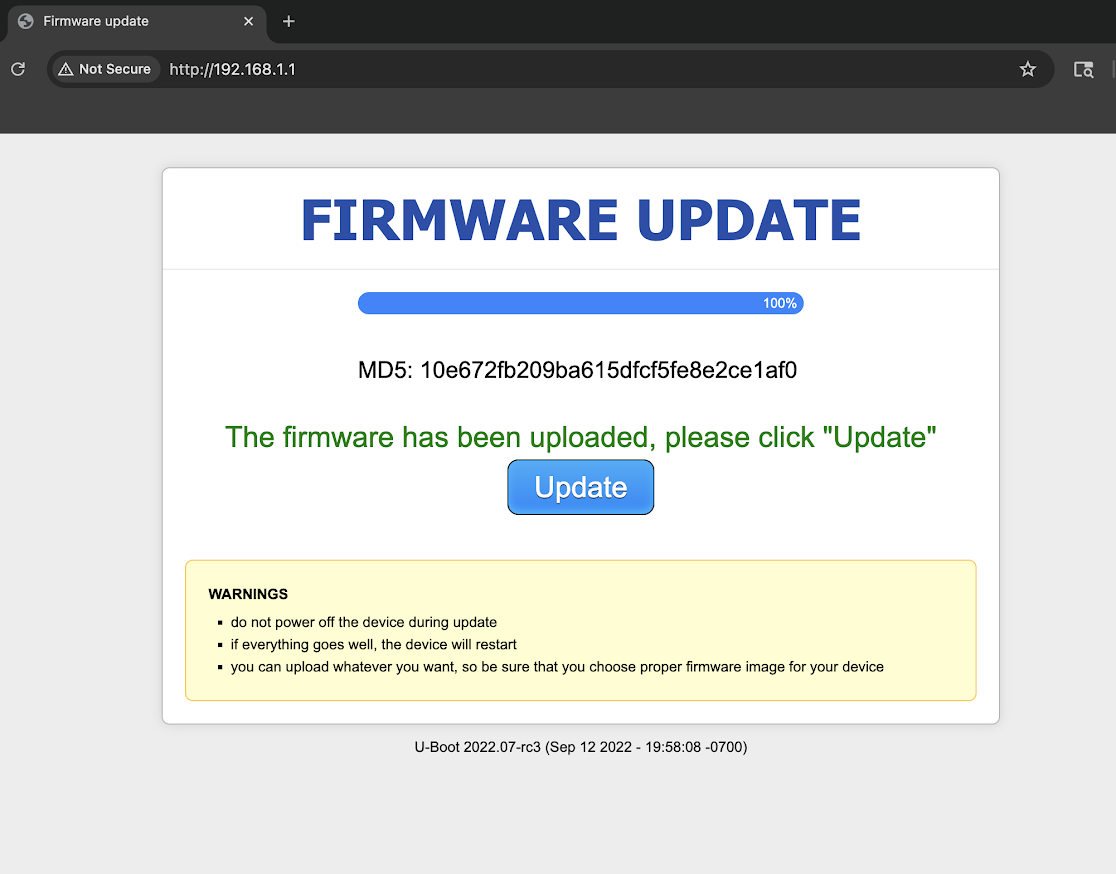 3. Firmware image uploaded and accepted by the old recovery UI
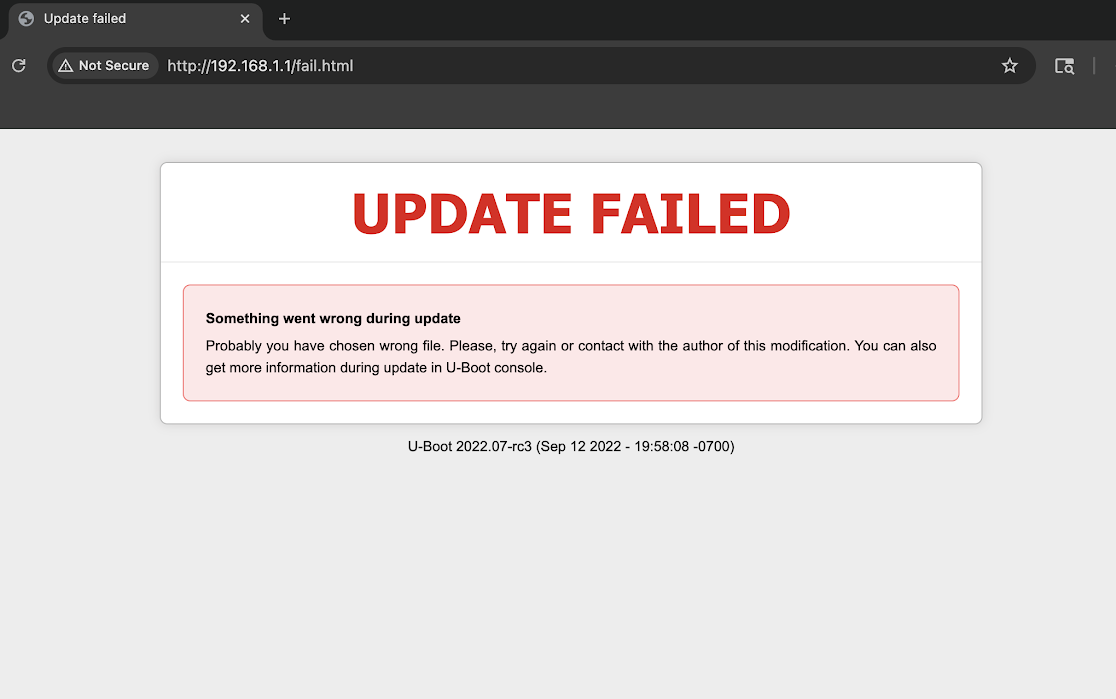 4. Firmware update attempt ended at the same generic failure page
Both update paths looked healthy until the final step. I kept the browser address and old U-Boot version string visible because they identify the recovery environment.
I also bypassed the visible form and posted directly to the same U-Boot HTTP handler:
curl -v -F [email protected] http://192.168.1.1/upload
curl -v http://192.168.1.1/flashing.html
That failed too. At this point the evidence matrix was simple:
Browser upload                 failed
Short filenames                failed
Temporary 4.6.10 firmware      failed
Stable 4.7.4 firmware          failed
Current beta firmware          failed
Official February 2025 U-Boot failed
Direct curl upload             failed
This stopped being a browser, cache, filename, or image-selection investigation. We needed the console hidden behind the generic web page.
Support approved a replacement
I also contacted GL.iNet support. They pointed me to the official two-step path: upload the February 2025 MT2500 U-Boot at http://192.168.1.1/uboot.html, then flash 4.7.4 from http://192.168.1.1/, using Chrome or Edge rather than Firefox. I confirmed that both files still failed with the same UPDATE FAILED / wrong file page. The unit was outside the normal warranty window and the extended window for affected devices, but GL.iNet reviewed the failure mode and approved a free like-for-like GL-MT2500A replacement as an exception. I appreciated that.
That could have been the end of the story. The practical problem was solved; the old unit could have been set aside. But it was still reaching U-Boot recovery, so I wanted to understand what had actually failed.
Before opening the case, there was one more recovery page to think about.
4. The gpt.html page I left alone
The old U-Boot exposed:
http://192.168.1.1/gpt.htmlHere GPT means GUID Partition Table. It describes where the eMMC partitions live: environment, radio/factory data, FIP, kernel, root filesystem, and so on. The page is useful when the console explicitly reports something like:
*** Partition 'rootfs' not found! ***
*** Please update GPT first! ***
I did not have that diagnosis, nor did I have an exact GL-MT2500 GPT image from a trusted source. A random gpt_main.bin from another MediaTek router could move or destroy partitions, including the radio/factory partition. Rewriting the partition map merely because the page existed would have converted an unknown failure into a self-inflicted one.
UART later showed that old U-Boot could not initialize the MMC device at all. A new partition table cannot help software that cannot communicate with the storage beneath it. After recovery, Linux did print warnings about the alternate GPT header not being at the end of the disk, but it found the partitions and mounted the filesystem. I left GPT alone throughout the successful repair.
5. What you’ll need
This was done on my personal MacBook Pro. My bench setup was:
- The bricked GL-MT2500/GL-MT2500A router.
- Wired Ethernet from the MacBook to the router’s LAN port. I used the LAN cable that came in the GL.iNet box.
- A USB-C Ethernet dongle, hub, or monitor hub if your MacBook does not have built-in Ethernet. In my case, I used the Ethernet port built into my Dell UltraSharp U2723QE monitor; this is the monitor I have (affiliate link).
- A 3.3 V USB-TTL UART adapter. I did not already own one, so I bought this CP2102 USB-TTL UART board (affiliate link).
- Jumper/test leads for
GND,TX, andRX. The CP2102 kit I bought came with these. I used the female Dupont ends on the adapter side and the small forked ends pressed onto the router’s UART pads. - Two USB-C cables if powering everything from the MacBook: one data-capable cable for the USB-TTL adapter, and one cable into the Brume 2’s normal USB-C power input. If the router is powered from its normal wall adapter, then only the adapter-to-Mac USB-C cable is needed.
- The official GL.iNet February 2025 MT2500 U-Boot/FIP file and model-correct firmware.
mtk_uartboot, the MT7981 DDR4 RAM BL2, Python 3, and a way to send XMODEM/CRC over the serial port.- The CNX Software GL-MT2500A teardown for disassembly and board orientation.
- Patience for loose jumper wires and missed BootROM timing windows.
6. Safety checklist before UART
Before attempting any part of this path:
- Confirm the exact model is GL-MT2500/GL-MT2500A, not a visually similar router.
- Use 3.3 V TTL logic. Do not use RS-232 levels or a 5 V-only UART adapter.
- Connect only
GND,TX, andRX; leaveVCCIO,3V3, and5Vdisconnected. - Power the router through its normal power input from a stable source.
- Prevent jumper wires from slipping and shorting adjacent pads.
- Use ESD precautions and avoid working on a conductive surface.
- Verify every image hash before sending it.
- Use the MT7981 DDR4 RAM BL2 for this device.
- Do not copy the MT7986 command visible in an unrelated/example screenshot.
- Start with read-only U-Boot commands.
- Do not run
mmc write,gpt write,gpt repair, ormtkupgradeuntil the device, partition map, and image are positively identified. - Never interrupt power during the FIP write, verification, environment erase, or firmware flash.
- Treat
mtkupgrade fipas a hard-brick-capable operation.
7. UART, USB-TTL, and the Flipper Zero detour
UART stands for Universal Asynchronous Receiver/Transmitter. In this context it is the router’s low-level serial console: effectively a keyboard and screen for the boot ROM and U-Boot before Linux or networking is available.
A USB-TTL adapter converts that 3.3 V serial signal into a normal computer serial device such as:
/dev/cu.usbserial-0001
/dev/ttyUSB0
COM6
I briefly considered using a Flipper Zero and inspected Flipper firmware source to sanity-check the idea. On paper, its USB-UART bridge can expose 3.3 V GPIO UART to a host, and it supports the baud rates involved. It would probably be fine for basic boot logs. mtk_uartboot, however, performs a timing-sensitive raw BootROM handshake and changes speeds during the transfer. A dedicated CP2102/FTDI/CH340 adapter removes a firmware bridge and one entire class of uncertainty. I used the dedicated adapter; the Flipper route was never tested on this router.
The adapter I used
The eventual hardware was a Waveshare CP2102 USB-TTL UART board with USB-C and a yellow 3V3/5V -> VCCIO selection jumper. I used this Amazon listing: CP2102 USB to UART (TTL) converter (affiliate link).
I set it to 3V3 <-> VCCIO.
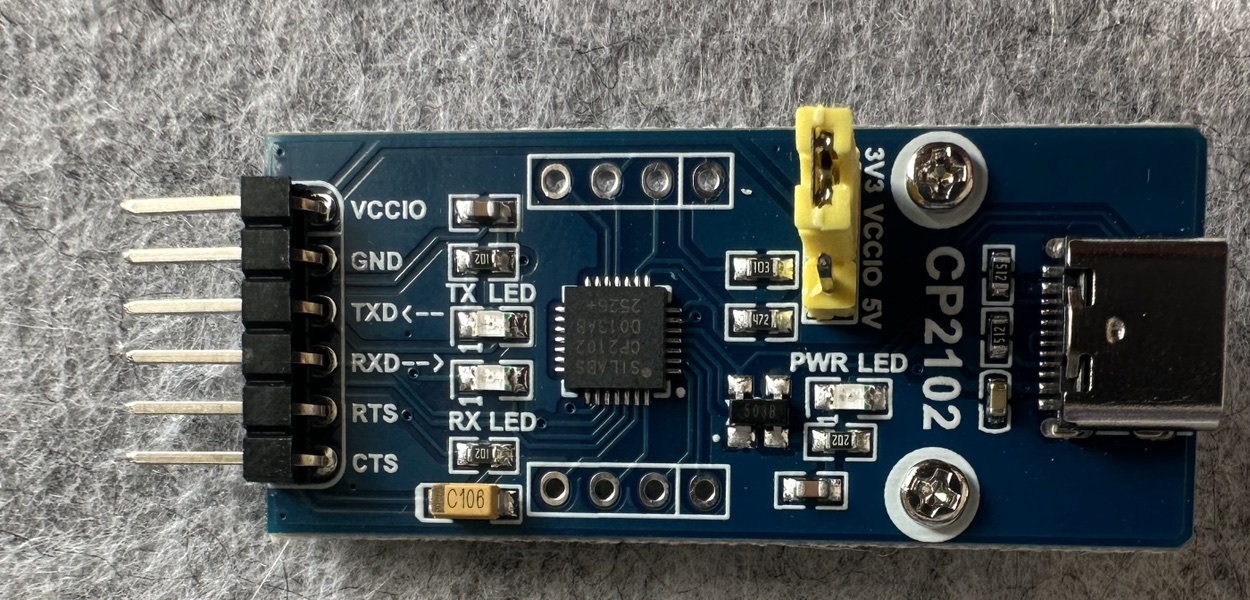 yellow shunt selects 3.3 V logic
3V3 to VCCIO, selecting 3.3 V UART logic. This is not a power wire to the router.The router UART was configured as:
115200 baud
8 data bits
No parity
1 stop bit
No flow control
Wiring and power
For opening the Alloy case and getting oriented inside the router, I used CNX Software’s GL.iNet GL-MT2500A review, unboxing, and teardown as a visual reference. The board’s UART pads are near the LAN port and are identified by the PCB silkscreen; I checked the markings on my own board rather than relying on a photo from another model or revision. I treated this as a strict three-wire connection:

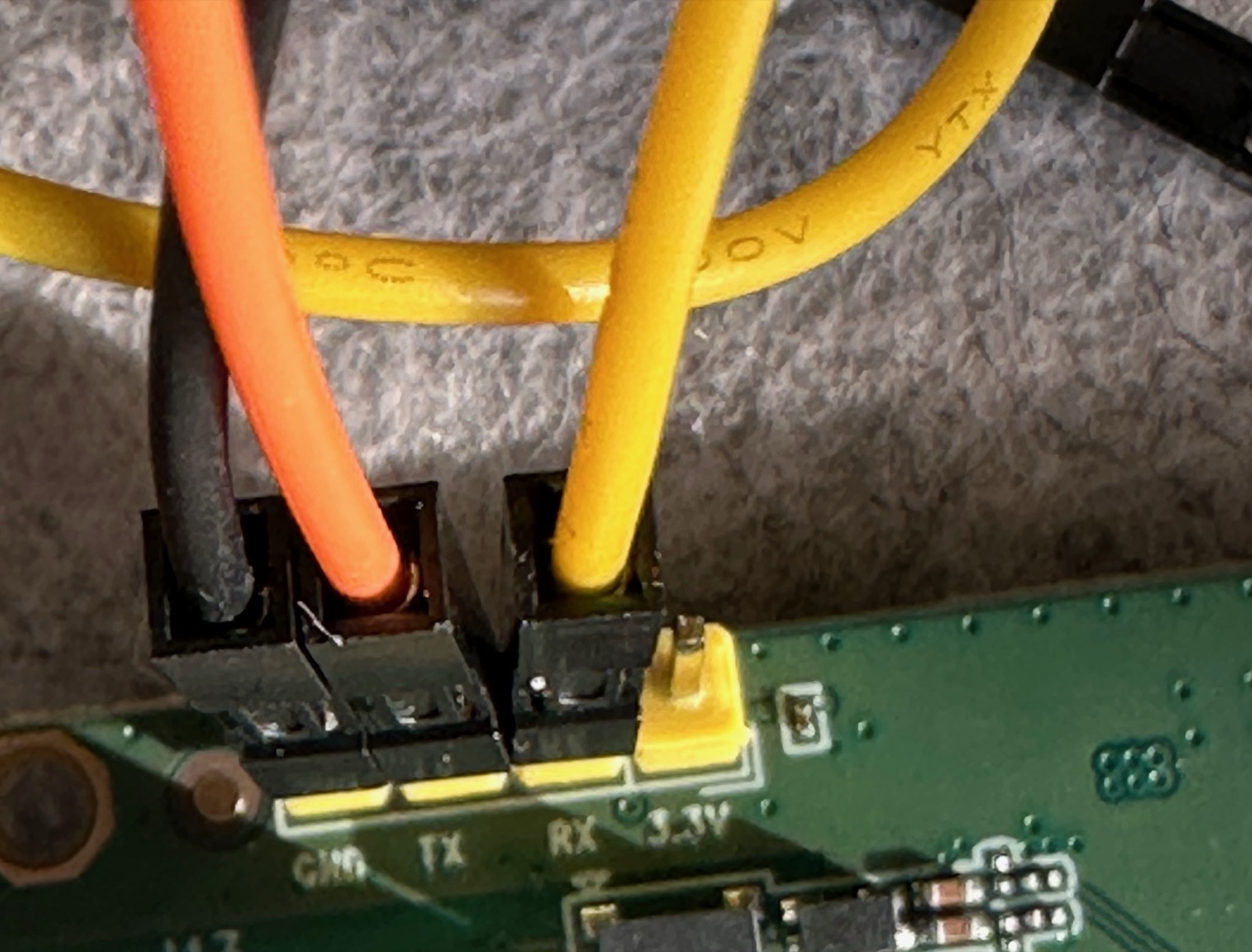
Black:  ground
Orange: TXD/RX data lead
Yellow: RXD/TX data lead
The power arrangement was separate:
Mac USB-C #1 -> powers CP2102 adapter
Mac USB-C #2 -> powers Brume 2 through its normal USB-C power input
No VCC/3V3/5V wire between adapter and router
During this recovery I powered the router from another USB-C cable plugged into my MacBook, not from a wall socket. The important part is that the router was powered through its normal power input, not through the UART adapter.
Never connect the adapter’s VCCIO, 3V3, or 5V pin to the router. The common ground is required; a second power feed is not. Also, a 3.3 V TTL UART adapter is not the same thing as an RS-232/DB9 adapter. Traditional RS-232 voltage levels can damage the board.
Normally TX and RX cross:
Adapter TXD -> target RX
Adapter RXD -> target TX
In the middle of debugging I briefly thought the working arrangement was label-for-label. Looking back, that was probably me misreading the adapter or board orientation while juggling loose Dupont leads. The practical rule is: establish ground, never connect power, start with crossed TX/RX, then recheck the labels and make sure the jumper connectors are firmly seated and actually making contact. Do not trust wire colors or copy my apparent labels without checking your own board.
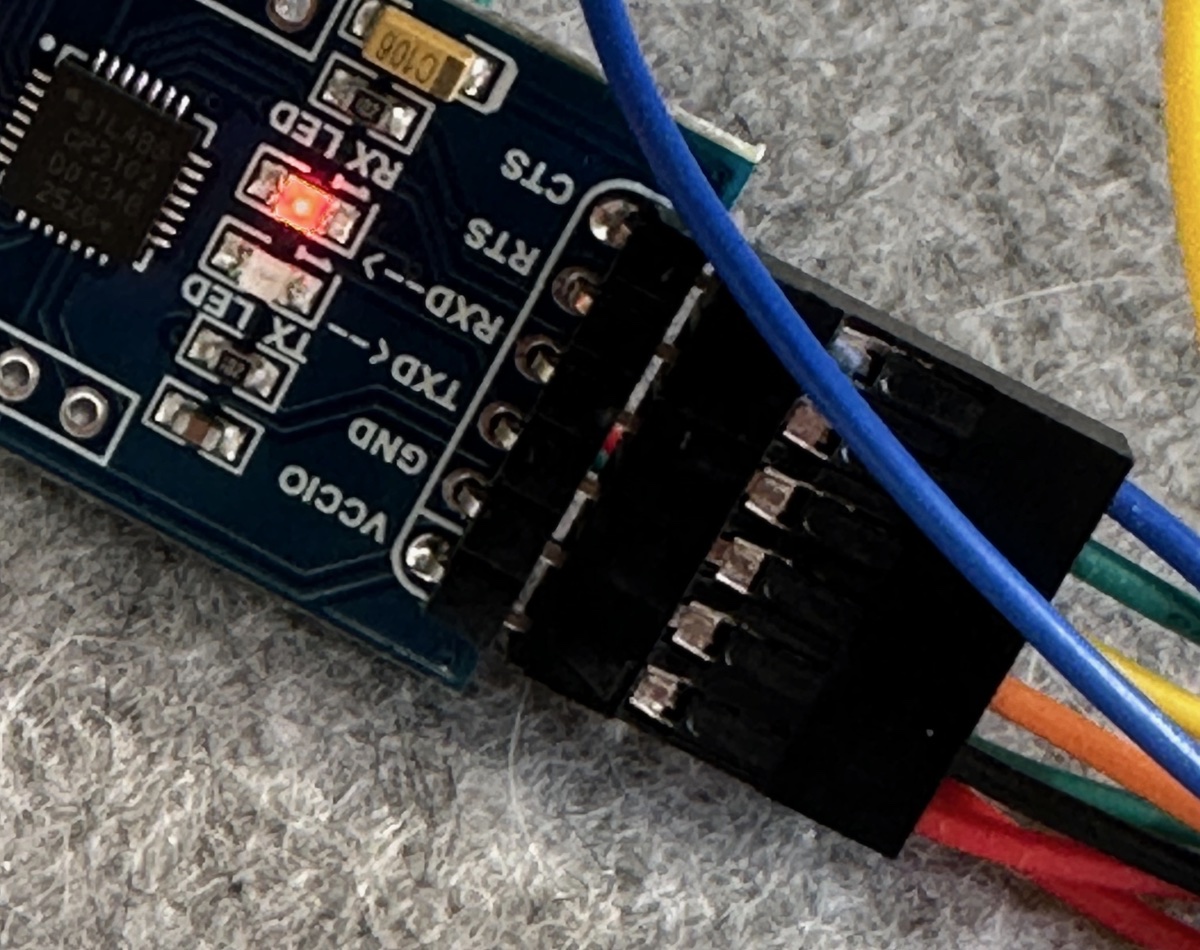 black/orange/yellow were the only router leads
VCCIO, RTS, and CTS stayed unused
black/orange/yellow were the only router leads
VCCIO, RTS, and CTS stayed unused
8. Getting a clean console
On macOS the adapter appeared as:
/dev/cu.usbserial-0001screen would have been enough for interactive logs:
screen /dev/cu.usbserial-0001 115200Instead, I used small Python helpers so the session could capture binary-safe logs and issue repeatable commands:
scripts/serial_capture.py
scripts/serial_cmd.py
A typical capture was:
python3 scripts/serial_capture.py \
  -p /dev/cu.usbserial-0001 \
  -b 115200 \
  -t 90 \
  -o serial-mt2500-115200.bin
The first attempts were realistic bench-debugging chaos: 48 garbled bytes, then no bytes, then missed power-on windows. I confirmed the 3.3 V jumper, reseated ground, rechecked TX/RX orientation, unplugged and reinserted the adapter, and started capture before resetting the router. Once the jumper leads were firmly seated and making contact, the complete log appeared.
9. The serial log changed the diagnosis
The old bootloader started normally enough:
U-Boot 2022.07-rc3 (Sep 12 2022 - 19:58:08 -0700)

CPU:   MediaTek MT7981
Model: mt7981-rfb
DRAM:  1 GiB
MMC:   mmc@11230000: 0
Then came the real problem:
Loading Environment from MMC... unable to select a mode : -110
mmc_init: -524, time 74
*** Warning - No block device, using default environment
...
unable to select a mode : -110
mmc_init: -524, time 74
*** Failed to initialize MMC device 0! ***
The browser’s “wrong file” page had hidden a storage initialization failure.
I interrupted autoboot with gl to reach:
MT7981>Then I ran only read-only diagnostics:
version
mmc list
mmc dev 0 0 0
mmc info
mmc part
gpt enumerate mmc 0
part list mmc 0
printenv
mmc list showed the controller, but that did not mean the eMMC itself had initialized. Every command that actually touched the device failed:
MT7981> mmc dev 0 0 0
unable to select a mode : -110
mmc_init: -524, time 75

MT7981> mmc info
unable to select a mode : -110
mmc_init: -524, time 74

MT7981> gpt enumerate mmc 0
unable to select a mode : -110
mmc_init: -524, time 74
do_gpt: mmc dev 0 NOT available
Trying the available MMC modes and rescans produced the same result. The default environment also explained the random MAC address visible in the boot log: U-Boot could not load its stored environment.
printenv also showed that, because the environment could not be loaded from MMC, U-Boot had fallen back to a tiny default environment. The important defaults were:
ipaddr=192.168.1.1
serverip=192.168.1.2
lf=mtkupgrade fw openwrt-gl-mt2500.bin
lu=mtkupgrade fip uboot-gl-mt2500.bin
That made the web behavior easier to understand: the failsafe page ultimately depended on mtkupgrade fw or mtkupgrade fip, both of which needed working MMC access.
The working diagnosis became:
The BootROM and old U-Boot were alive, but the September 2022 U-Boot could not initialize eMMC. Therefore every web update that needed to read or write eMMC failed behind a generic error.
The remaining question was whether the eMMC was physically dead or merely inaccessible to that bootloader.
10. Preparing a RAM-only 2025 U-Boot test
I did not come up with the UART path from scratch. On the GL.iNet forum, user ywp posted the MT2500 UART debrick Notion guide, and user alzhao described it as a method even when U-Boot is bricked. That guide pointed to mtk_uartboot, the host-side MediaTek BootROM loader published by GitHub user 981213. The RAM BL2 came from the same user’s tf-a-mtk v2.10.0 release. Without those forum posts and tools, this recovery almost certainly would not have happened.
The guide was useful but unofficial, and one example displayed an MT7986 BL2 command. The Brume 2 is MT7981, so blindly copying that example would be wrong. My contribution here was to verify the exact files, commands, partition target, and logs for this GL-MT2500A failure mode.
The boot chain I was testing looked like this:
BootROM -> RAM BL2 -> FIP containing ATF/U-Boot -> LinuxA note on names: GL.iNet published the official file as uboot-mt2500-20250224-...bin. In this post, fip-mt2500-20250224.bin and uboot-gl-mt2500.bin refer to renamed, byte-identical working copies of that same official February 2025 MT2500 image. I used shorter names only to make commands less error-prone.
The prepared files were:
Host loader
mtk_uartboot v0.1.1, Apple arm64
SHA-256
2e9fd0735ec37b525c17713fdbfa0d999bc4329e1f0f1aadba01754d649a061d
Host-side BootROM loader.
RAM BL2
bl2-mt7981-bga-ddr4-ram.bin
SHA-256
12036187bf5d6cdd2d287163449c27e4c6ea81f97091e9be204a588490c776b7
RAM-oriented MT7981 DDR4 BL2.
Official 2025 FIP
fip-mt2500-20250224.bin
SHA-256
90b28ab596783e8cab09e1e38d77a37cdbc1e3b9fba855847bc8248b213a40be
Temporary FIP first, permanent FIP later.
Fallback 2022 FIP, not used
fip-mt2500-old-notion.bin
SHA-256
27c08443322f42f68b7c866bd1bc661eeed79b499b044b39d37cd18bb95f313a
Kept from the Notion bundle as a fallback, but not used for the successful repair.
Only the official February 2025 MT2500 FIP was sent during the successful repair.
The working directory looked like this:
~/Downloads/mt2500-uartboot/
├── mtk_uartboot
├── bl2-mt7981-bga-ddr4-ram.bin
├── fip-mt2500-20250224.bin
├── fip-mt2500-old-notion.bin
└── uboot-gl-mt2500.bin
The central command was:
cd ~/Downloads/mt2500-uartboot
./mtk_uartboot \
  -s /dev/cu.usbserial-0001 \
  -a \
  -p bl2-mt7981-bga-ddr4-ram.bin \
  -f fip-mt2500-20250224.bin
The loader must already be waiting at Handshake... when the SoC enters its earliest BootROM window. Several manual power-cycle attempts missed it because the timing window is short and my jumper leads were still loose.
The reliable solution was to start at the old MT7981> prompt, send reset, wait only about 20 ms, and immediately launch mtk_uartboot. That let the host catch BootROM during the software reset without depending on a hand plugging in power at exactly the right instant.
11. The first successful RAM boot
The successful transfer looked like this:
mtk_uartboot - 0.1.1
Using serial port: /dev/cu.usbserial-0001
Handshake...
hw code: 0x7981
hw sub code: 0x8a00
hw ver: 0xca00
sw ver: 0x1
Baud rate set to 460800
sending payload to 0x201000...
Checksum: 0x6f0e
Setting baudrate back to 115200
Jumping to 0x201000 in aarch64...
Waiting for BL2. Message below:
==================================
NOTICE:  BL2: v2.10.0 (release):v2.10.0-mtk
NOTICE:  WDT: [40000000] Software reset (reboot)
NOTICE:  EMI: Using DDR4 settings
NOTICE:  EMI: Detected DRAM size: 1024MB
NOTICE:  EMI: complex R/W mem test passed
NOTICE:  CPU: MT7981 (1300MHz)
NOTICE:  Starting UART download handshake ...
==================================
BL2 UART DL version: 0x10
Baudrate set to: 921600
FIP sent.
==================================
NOTICE:  Received FIP 0x9c8ed @ 0x40400000 ...
==================================
This also explains why I preferred a plain USB-TTL adapter: the session moved through 115200, 460800, and 921600 baud during a timing-sensitive handshake.
On the first RAM boot we missed the short gl interruption window, so the temporary 2025 U-Boot continued into the firmware already stored on eMMC. That accidental continuation produced the best diagnostic result of the entire project:
[    7.928941] F2FS-fs (mmcblk0p7): Mounted with checkpoint version = 367a8f2e
...
GL-MT2500 login:
At minimum, the eMMC was readable and bootable under the 2025 boot chain. The same board that old U-Boot called “No block device” had just mounted its F2FS overlay and reached a Linux login prompt under the RAM-loaded 2025 boot chain.
At this stage nothing permanent had been written. A power cycle would still return to the broken September 2022 U-Boot. That made RAM boot a powerful and relatively contained diagnostic: prove the candidate bootloader works before committing it to flash.
12. Catching the temporary 2025 U-Boot prompt
To install the repair permanently, I needed to RAM-boot the new FIP again and stop its two-second autoboot countdown. The automation in scripts/ramboot_interrupt.sh did three things:
- Sent
resetto the old U-Boot. - Ran
mtk_uartbootwith the MT7981 RAM BL2 and official 2025 FIP. - Reopened UART and sent
gl\rrepeatedly until the new prompt appeared.
I ran:
bash scripts/ramboot_interrupt.sh /dev/cu.usbserial-0001This time the console stopped here:
U-Boot 2022.07-rc3 (Feb 24 2025 - 15:04:07 +0800)

CPU:   MediaTek MT7981
Model: mt7981-rfb
DRAM:  1 GiB
MMC:   mmc@11230000: 0
Loading Environment from MMC... *** Warning - bad CRC, using default environment
...
Enter "gl" to stop autoboot in 2 seconds
MT7981>
The bad CRC warning was not the original fatal MMC error. The temporary new U-Boot was now able to inspect the card:
MT7981> mmc info
Device: mmc@11230000
Manufacturer ID: 15
Name: 8GTF4R
Bus Speed: 52000000
Mode: MMC High Speed (52MHz)
MMC version 5.1
High Capacity: Yes
Capacity: 7.3 GiB
Bus Width: 8-bit
Boot Capacity: 4 MiB ENH
RPMB Capacity: 512 KiB ENH
And the GPT was readable:
Partition Map for MMC device 0 -- Partition Type: EFI

1  "log"
2  "u-boot-env"
3  "rf"
4  "fip"
5  "kernel"
6  "rootfs"
This was enough evidence for me to proceed on this unit: new U-Boot in RAM could see the eMMC, the partition table, and the fip target. Only then did I consider a permanent write.
13. Flashing the permanent FIP over XMODEM
The temporary 2025 U-Boot exposed MediaTek’s upgrade command:
MT7981> mtkupgrade fip

*** Upgrading ATF FIP ***

Available load methods:
    0 - TFTP client (Default)
    1 - Xmodem
    2 - Ymodem
    3 - Kermit
    4 - S-Record
    5 - RAM
Before sending anything, I also checked GL.iNet’s U-Boot source rather than trusting the command name alone. In uboot-mtk-20220606/board/mediatek/mt7981/bootmenu_emmc.c, mtkupgrade fip maps to write_fip(), which writes the board-defined fip partition and then erases the U-Boot environment as a post-action. The source also shows the fixed fallback offset and size for this platform:
[UPGRADE_PART_FIP] = {
    .name = "fip",
    .offset = 0x680000,
    .size = 0x200000,
}
That matched the live GPT and the write log. This source check is why I was comfortable using mtkupgrade fip but still avoided raw mmc write commands.
I could have configured Ethernet and TFTP, but UART was already stable and the Mac did not have an sx sender installed. I wrote scripts/mtkupgrade_fip_xmodem.py, a small XMODEM/CRC sender that:
- Waited for
MT7981>. - Issued
mtkupgrade fip. - Selected method
1for XMODEM. - Sent the exact 641,261-byte official February 2025 FIP in 128-byte CRC-protected packets.
- Waited for U-Boot’s write and verify result.
The host command was:
python3 scripts/mtkupgrade_fip_xmodem.py \
  -p /dev/cu.usbserial-0001 \
  -f ~/Downloads/mt2500-uartboot/uboot-gl-mt2500.bin \
  | tee mtkupgrade-fip-xmodem.log
The transfer took 5,010 packets and completed cleanly:
Sending 641261 bytes as 5010 XMODEM/CRC packets...
...
641261/641261 bytes
Sending EOT...
EOT ACKed

*** Loaded 641261 (0x9c8ed) bytes at 0x46000000 ***

Writing from 0x46000000 to 0x680000, size 0x9c8ed ... OK
Verifying from 0x680000 to 0x71c8ec, size 0x9c8ed ... OK

*** ATF FIP upgrade completed! ***

Erasing environment from 0x400000 to 0x47ffff, size 0x80000 ... OK
MT7981>
This was the dangerous, permanent step. The address was not guessed: the readable GPT identified the fip partition, and mtkupgrade fip selected the board-defined target. I did not use mmc write, dd, or a hand-calculated partition command.
Verifying a normal reboot
The OK from mtkupgrade was not enough. I wanted to see the board boot by itself, so I ran reset and captured the next boot without starting mtk_uartboot.
The board now loaded the new build on its own:
U-Boot 2022.07-rc3 (Feb 24 2025 - 15:04:07 +0800)It read the kernel from eMMC, verified the FIT hashes, and started Linux:
Reading from 0x880000 to 0x46000000, size 0x37f8e7 ... OK
## Loading kernel from FIT Image at 46000000 ...
Verifying Hash Integrity ... crc32+ sha1+ OK
Starting kernel ...
Linux independently confirmed the storage:
mmc0: new high speed MMC card at address 0001
mmcblk0: mmc0:0001 8GTF4R 7.28 GiB
mmcblk0boot0: ... 4.00 MiB
mmcblk0boot1: ... 4.00 MiB
mmcblk0rpmb: ... 512 KiB
...
F2FS-fs (mmcblk0p7): Mounted
...
GL-MT2500 login:
At that point I had proof that the bootloader repair survived a normal reset.
14. Returning to the firmware recovery page
The bootloader was fixed, but I still wanted a clean firmware installation. I entered U-Boot failsafe again with the normal Reset-button sequence: power off, hold Reset while applying power, and release after the Brume 2 power LED flashes blue about five times and the pattern changes.
The computer remained connected to the LAN port, not WAN, with:
Mac Ethernet: 192.168.1.2/24
Recovery page: http://192.168.1.1/
The page now showed the decisive version string:
U-Boot 2022.07-rc3 (Feb 24 2025)There was no reason to flash U-Boot again. I used only the firmware upload page. Stable 4.7.4 was the official conservative recommendation. The final file I actually selected was the newer beta image, but that was incidental to my last validation run, not a requirement for this FIP repair:
~/Downloads/mt2500-4.9.0_beta3-1048-0704-1783130560.bin
SHA-256: fc1e641c1fda38efee35c86645215defb651b6df12fbc6f7997d2346702da86a
What matters to the recovery mechanism is that the same web updater that had rejected every file under old U-Boot now accepted this firmware, displayed its restart spinner, and completed the write.
15. Switching back to the normal network
After the firmware upload, I waited for the write and reboot to finish. The recovery page and the normal GL.iNet UI use different subnets:
U-Boot recovery page: http://192.168.1.1/
Normal GL.iNet UI:    http://192.168.8.1/
The Ethernet cable still belongs in the Brume 2 LAN port, not WAN:
Mac/computer -> Brume 2 LAN
Upstream Internet -> Brume 2 WAN, later
During recovery my USB Ethernet interface, en13, was still set to the recovery subnet:
en13 = 192.168.1.2For the normal UI I changed that wired interface to the normal GL.iNet subnet. I also disabled Wi-Fi temporarily so macOS would not try to reach 192.168.8.1 through some other route or interface. With Wi-Fi off, the only path was the LAN cable into the Brume 2.
sudo ifconfig en13 inet 192.168.8.2 netmask 255.255.255.0 up
ping 192.168.8.1
Then I opened:
http://192.168.8.1/The GL.iNet setup UI loaded, and I set a new admin password.
16. Final state
The recovered router had all of the outcomes I wanted:
Permanent U-Boot: Feb 24 2025 15:04:07 +0800
Normal boot from eMMC: verified
Firmware upload from U-Boot recovery page: successful (beta3 in my run; stable 4.7.4 is the conservative recommendation)
GL.iNet web UI at 192.168.8.1: working
Admin password configured
UART dependency after repair: none
17. Sources and artifacts
This post is based on the session transcript, local crawl artifacts, and the public references below. The full local corpus is retained in the project; this is the compact source map.
Official GL.iNet
- Debrick / U-Boot recovery
- firmware upgrade UI
- U-Boot upgrade
- MT2500/X3000/XE3000 critical notice
- stable firmware
- beta firmware
- MT798x bootloader repo
- February 2025 MT2500 U-Boot/FIP
- MT7981 eMMC/FIP mapping source
Forum and recovery notes
- MT2500/MT2500A bricked after update
- ywp’s forum post linking the UART guide
- alzhao confirming the UART method
- U-Boot debrick failure thread
- 4.6.8 → 4.7.0 failure
- Brume 2 U-Boot update failed
- critical notice discussion
- Recover U-Boot on GL-MT2500
- MT2500 UART debrick Notion page
- CNX Software GL-MT2500A teardown
- Eko.one.pl MT2500 thread
MediaTek UART boot tooling
- mtk_uartboot
- mtk_uartboot releases
- tf-a-mtk v2.10.0 MT7981 RAM BL2
- OpenWrt PR #18433 on eMMC anomalies
- Flipper USB-UART bridge source
- Flipper UART config source
Local artifacts
Sanitized research reports, forum topic JSON, helper scripts, source snapshots, and proof logs are bundled in one public GitHub Gist: GL-MT2500A Brume 2 debrick artifacts. Firmware binaries are intentionally not included.
Useful artifacts
- Old U-Boot repeatedly hit
mmc_init: -524. - A RAM-loaded 2025 boot chain mounted
mmcblk0p7and reached Linux. - The same 2025 U-Boot could list eMMC partitions and identify
fip. - XMODEM verified the permanent FIP write.
- A normal reboot loaded the February 2025 U-Boot, accepted firmware, and returned to the GL.iNet UI.
That sequence turned a misleading “wrong file” brick into a working Brume 2 and showed what had blocked the normal recovery path.
I hope this helps keep another bricked Brume alive. Happy hacking.